Premium Options
Please Note: If you make changes to the options on any of the tabs, the Save icon in the bottom right-hand corner of the window will turn blue. You must save your changes before navigating out of this window.
Company Name Tab
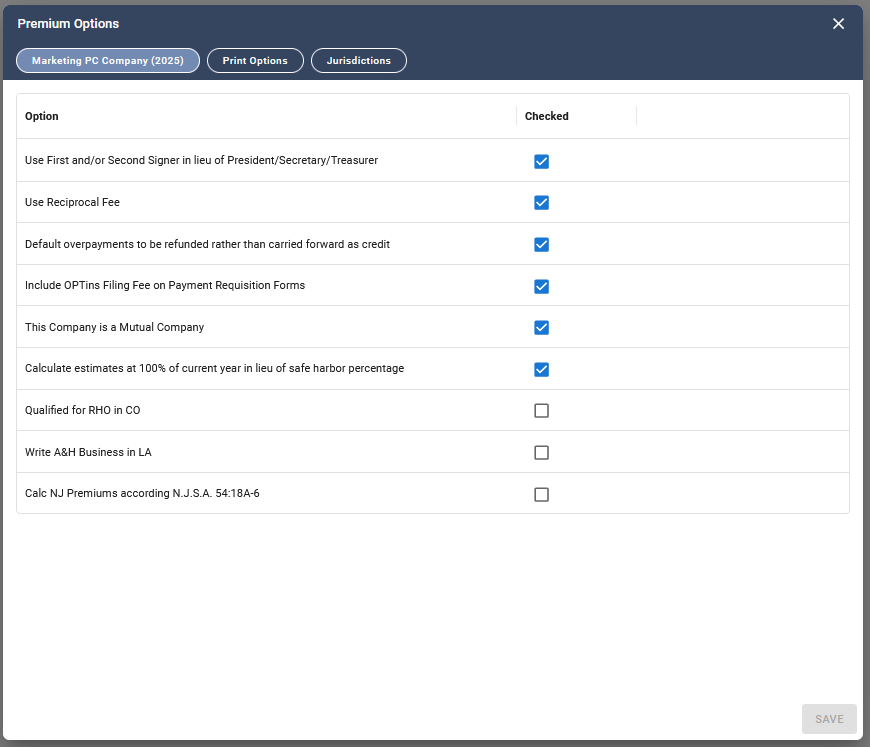
The first tab in this window is for options that are unique to filings for the listed company. The options available in this tab include:
- Use First and/or Second Signer in like of President/Secretary/Treasurer determines if the First and/or Second Signer from the company’s General Information will always be used on the returns in lieu of the President, Secretary, or Treasurer.
- Use Reciprocal Fee
- Default overpayments to be refunded rather than carried forward as a credit
- Include OPTins Filing Fee on Payment Requisition Forms – Check this option if you would
like to include the OPTins filing fee on payment requests.
- This Company is a Mutual Company
- Calculate estimates at 100% of current year in lieu of safe harbor percentage
- Qualified for RHO in CO – Check this option if your company is not domiciled in CO but qualifies for Regional Home Office treatment. When this option is checked, the Domestic/Regional Home Office return will be used instead of the foreign return. The foreign return will remain active, but electronic filing should be initiated from the Domestic/RHO return and the Domestic/RHO return will be used to populate the Summary of Taxes.
- Write A&H Business in LA
- Calc NJ Premiums according to N.J.S.A. 54:18A-6 – Check this option to indicate that the company is eligible to calculate taxable premiums as provided in N.J.S.A. 54:18A-6 (12.5% Premium Tax Cap). This box must be checked for this section of the return to populate.
Related Articles
Was this helpful?